> For the complete documentation index, see [llms.txt](https://docs.b2b-sellers.com/b2b-platform/llms.txt). Markdown versions of documentation pages are available by appending `.md` to page URLs; this page is available as [Markdown](https://docs.b2b-sellers.com/b2b-platform/3/user-guide/configuration-of-purchasable-addons/order-lists.md).
# Order Lists
Directory: custom/plugins/B2BSellersCore/addons/B2bProductLists
Known from the B2C-sector as wish lists or notepads, the B2Bsellers Suite provides order lists (also called order templates or product lists). The order lists are acquired with the Core- Plugin, however, must be downloaded and installed as a standalone plugin (B2bProductLists).
## **Version Changes**
{% hint style="info" %}
From version 2.2.3 onwards, importing lists is only possible using CSV files.
{% endhint %}
## **Mode of operation**
The logged-in B2B-costumer gets the button "On the order list" in the product box in the product listing and on the item detail page. If you open the drop-down menu, all available order lists will be displayed. If the item is already in an order list, this will be shown by a green tick before the order list. Alternatively, a new order list can be created.
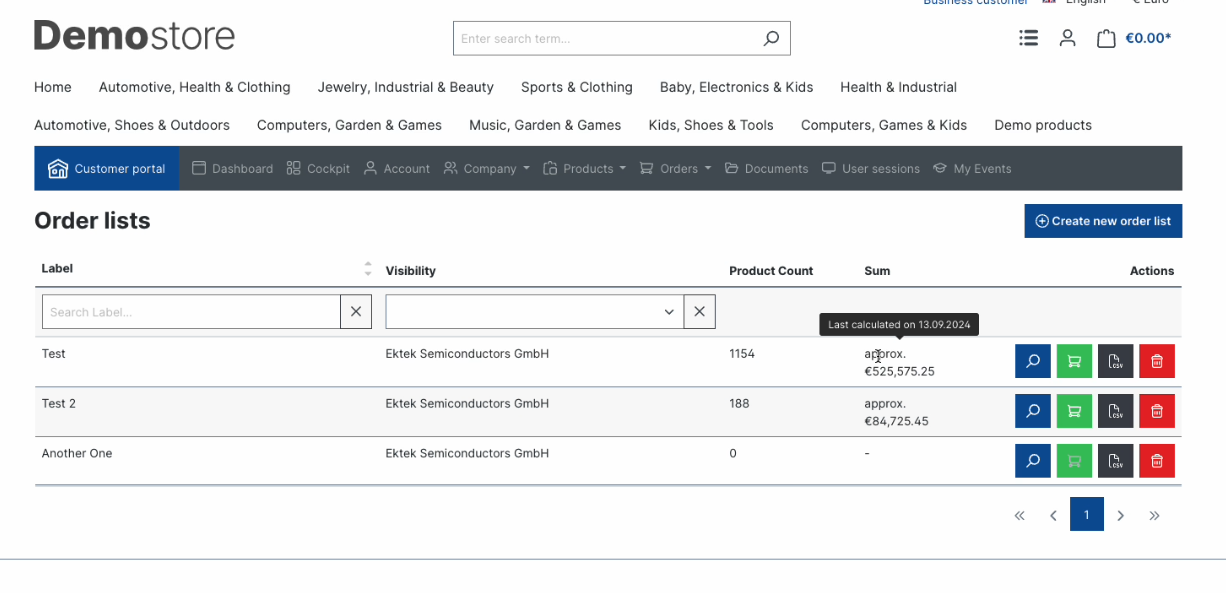
Through the Icon "Order lists" in the header you get the overview of all created order lists.\
This menu item is also visible in the B2B platform navigation.
In the database, any type of order lists can be created. These order list types can be used for all customizations and accordingly configured in the plug-in config.
### **By default, the following lists are provided**
* My assortment
* Default
* Products added to the shopping cart
* Sales Representative Lists
### **Features**
* Creation of private order lists
* Usage of Cross-employee (company-wide) possible
* Intelligent order lists are automatically filled with items based on triggers. (e.g. when items have been placed in the shopping cart but not purchased or when a customer has visited a product detail page for longer than 30 seconds)
* Items can be placed in an order list by each customer
* Search function within an order list
* Adding item-comments to an order list
* Placing items from the order list in the shopping cart
* Entire lists can be deleted by the customer depending on the authorization/plug-in config.

## Technical info
The order lists in the frontend were developed in two different ways. Normal JavaScript for no "B2B Platform customers" and for all users who have access to the B2B Platform, the order lists were developed on the basis of Vue.js and bring their full advantages.
## Price Calculation for Order Lists
In order to enhance the performance of the order lists view, we are displaying an approximate estimate of the price for items inside the order list.
This price is updated by an automatically scheduled task running once a day.
{% hint style="info" %}
If you want to force an update to the price calculation, you can run the following command on the server for your shop's root directory
{% endhint %}
```
bin/console b2b:product-lists:calculate
```
## Entities
{% content-ref url="/pages/COwRjnImPgveyMfSPaR0" %}
[B2bProductList](/b2b-platform/3/api-references/entities/b2bproductlist.md)
{% endcontent-ref %}
{% content-ref url="/pages/LlH7RRY04bGW2U8QNvHZ" %}
[B2bProductListItem](/b2b-platform/3/api-references/entities/b2bproductlist/b2bproductlistitem.md)
{% endcontent-ref %}
{% content-ref url="/pages/dpfwbC6MlpLLfnB2yc5S" %}
[B2bProductListType](/b2b-platform/3/api-references/entities/b2bproductlist/b2bproductlisttype.md)
{% endcontent-ref %}
## Further Reading
* [Configuration of Admin Settings](https://docs.b2b-sellers.com/b2b-platform/user-guide/available-add-ons/order-lists)
* [Using Order Lists as an Employee](https://docs.b2b-sellers.com/b2b-platform/user-guide/using-the-b2b-platform/customer-portal/order-lists-as-an-employee)
---
# Agent Instructions
This documentation is published with GitBook. GitBook is the documentation platform designed so that both humans and AI agents can read, navigate, and reason over technical content effectively. Learn more at gitbook.com.
## Querying This Documentation
If you need additional information that is not directly available in this page, you can query the documentation dynamically by asking a question.
Perform an HTTP GET request on the current page URL with the `ask` query parameter, and the optional `goal` query parameter:
```
GET https://docs.b2b-sellers.com/b2b-platform/3/user-guide/configuration-of-purchasable-addons/order-lists.md?ask=&goal=
```
`ask` is the immediate question: it should be specific, self-contained, and written in natural language.
`goal` is optional and describes the broader end goal you are ultimately trying to accomplish on behalf of the user. GitBook uses it to tailor the answer towards what is most useful for that goal.
The response will contain a direct answer to the question and relevant excerpts and sources from the documentation.
Use this mechanism when the answer is not explicitly present in the current page, you need clarification or additional context, or you want to retrieve related documentation sections.